











Frequently Asked Questions
Recent Information Regarding Updates to Wanderful Apps
Which devices and operating systems can run Wanderful interactive storybooks?
How do I change languages within an App?
What is in the Premium upgrade?
What is the Classroom Activities guide?
How do I move from page to page within the app?
Can I customize the onscreen reading experience for my child/students?
How do I control the storybook's volume?
What if my sound still doesn’t work?
I'm having trouble starting my Wanderful App
My Wanderful app did not download/install to my device.
The App Store says the Wanderful app is "INSTALLED" but I can't find it.

Recent Information Regarding
Updates to Wanderful Apps
Mac OSX 10.6 issue
On September 24th Wanderful released updates to its Mac OSX Apps to version 1.1. This update did not add anything major to the App, but did set the Full Screen setting ON by default, which relies upon a feature in iOS 10.7 and later versions of OSX. However, this caused problems for OSX 10.6 users. So, on November 4th Wanderful released an update for all its OSX apps to version 1.2 fixing this issue for any OSX 10.6 users. OSX 10.7 users were not impacted, and need not update to the latest version. iOS 10.6 users MUST update to version 1.2 of a Wanderful Mac app if they are encountering any issues. Note, the Mac OSX Wanderful Sampler app has not been updated and the current 1.0 version works fine for Mac OSX 10.6 and later.
iOS sound problems
For iOS App users, we continue to see a few people who experience "sound" problems with the Apps. This has repeatedly turned out to be a problem with the "MUTE" switch settings, which Apple exacerbated by changing how this slide switch works on the devices in one of its iOS update releases. If you are encountering problems with "NO SOUND" on any of the iOS Wanderful Apps, please see the instructions below under the SOUND heading.
If you have ANY issues or problems that you cannot resolve, please contact us immediately via email ([email protected]) or telephone (800-823-0637) and we will ensure your issues are addressed or a refund issued to you if the issue(s) cannot be resolved satisfactorily.
Recent Information Regarding
Updates to Wanderful Apps
Mac OSX 10.6 issue
On September 24th Wanderful released updates to its Mac OSX Apps to version 1.1. This update did not add anything major to the App, but did set the Full Screen setting ON by default, which relies upon a feature in iOS 10.7 and later versions of OSX. However, this caused problems for OSX 10.6 users. So, on November 4th Wanderful released an update for all its OSX apps to version 1.2 fixing this issue for any OSX 10.6 users. OSX 10.7 users were not impacted, and need not update to the latest version. iOS 10.6 users MUST update to version 1.2 of a Wanderful Mac app if they are encountering any issues. Note, the Mac OSX Wanderful Sampler app has not been updated and the current 1.0 version works fine for Mac OSX 10.6 and later.
iOS sound problems
For iOS App users, we continue to see a few people who experience "sound" problems with the Apps. This has repeatedly turned out to be a problem with the "MUTE" switch settings, which Apple exacerbated by changing how this slide switch works on the devices in one of its iOS update releases. If you are encountering problems with "NO SOUND" on any of the iOS Wanderful Apps, please see the instructions below under the SOUND heading.
If you have ANY issues or problems that you cannot resolve, please contact us immediately via email ([email protected]) or telephone (800-823-0637) and we will ensure your issues are addressed or a refund issued to you if the issue(s) cannot be resolved satisfactorily.
Support Information:
Devices:
Which devices and operating systems can run Wanderful interactive storybooks?
Wanderful iOS Apps currently support the iPad, iPhone and iPod Touch running iOS 3.2 or later.
Wanderful Mac OSX Apps are available now for Mac OSX computers running OSX 10.6.6 or later. Wanderful Android Apps are available now on Google Play and the Amazon Android App stores.
Can I add another language?
For iOS Apps, French is available as an in-app purchase for most of our US English apps. From the OPTIONS page within the App, tap on the “Languages and More” button and then the “Upgrade Now $1.99” button. This will unlock the French Language content within your app. Note, there is no additional language available for Arthur’s Teacher Trouble, Berenstain Bears In The Dark, or Ruff's Bone. For the UK English apps, German is the third language and is unlocked through an in-App purchase.
For Mac OSX and Android Apps, additional languages cannot be added.
How do I change languages within an app?
From any storybook page, tap on the Globe icon in the upper left corner. Then tap on the blue button corresponding to your preferred language. All story pages will immediately transform to your selected language. Note: if a language requires an in-App upgrade before it is enabled, its button will be grey.

Premium Upgrade:
What is in the Premium Upgrade?
The premium upgrade includes the full 40-70 page Classroom Activities guide for that title plus the additional language content for the title (when available). The Premium upgrade costs $2.99 per title.
• For Mac OSX Apps, the Classroom Activities guide is included in the purchase price.
• For Android Apps, the Classroom Activities guide is available via a link in the "languages and more" area of the OPTIONS page.
How do I upgrade to Premium?
From the Options page within the App, tap on the “Languages and More” button and then scroll through the options until you see the Premium Upgrade.
What is the Classroom Activities guide?
The Classroom Activities guide provides teachers and parents with activities built around the storybook and aligned with the new USA Common Core State Standard, making integration of these Apps easy into classroom curricula. Each App has a unique Classroom Activities guide distributed as a standalone PDF document.
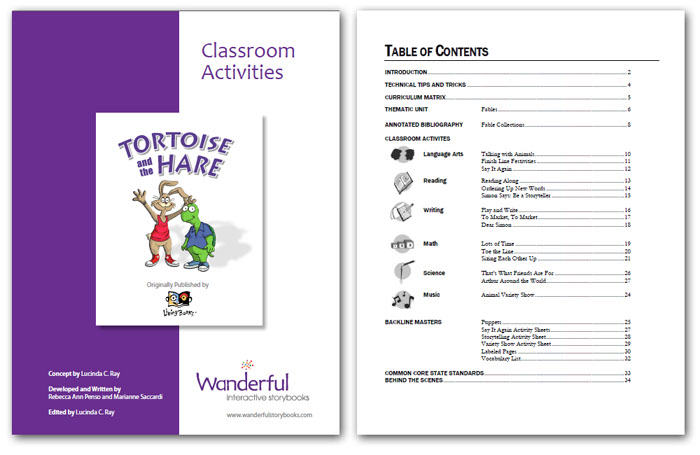
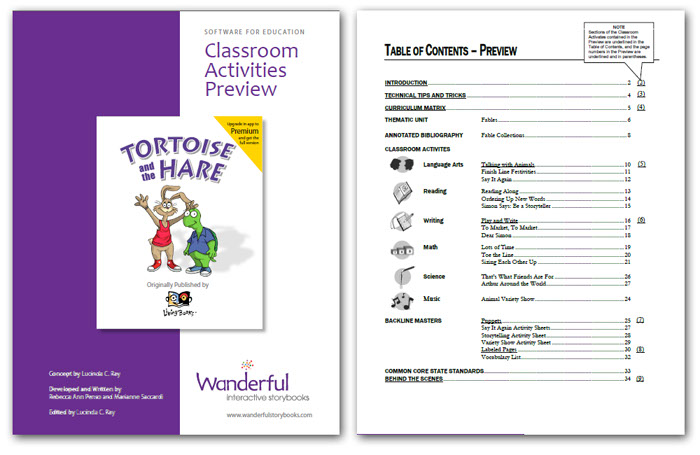
A Preview version of the Classroom Activities guide is included FREE with each App so that you can review the kind of information in the full Classroom Activities guide. You will find access to this in the teacher resources page of OPTIONS. The table of contents of the Classroom Activities Preview is the full Classroom Activities table of contents, which has been annotated so that you can tell what sections have been included in the Preview while also seeing what the full Classroom Activities guide contains.
Read more about the Classroom Activities Guides
Download a FREE preview on our Teachers Page.
Page Navigation:
How do I move from page to page within the app?
From any story page you can move forward one page by swiping to the left or tapping the arrow in the lower right corner. Likewise, you can move to the previous page by swiping to the right or tapping the arrow in the lower left corner. To move to a specific page, tap the Book icon in the upper right, then swipe the page navigator and tap on the page to which you wish to move.
Settings:
Can I customize the onscreen reading experience for my child/students?
Yes, from the Options page tap on “Settings” to see the various customizations that can be saved. The Settings that can be customized include:
Bookmark:
If you want to pick up where you left off in a story, then use this setting. The next time you come back to the App, you will start on the same page where you left. If you prefer to have the App start at the beginning each time, then turn this setting OFF.
Patience Mode:
When set OFF, every animation is interruptible. When set ON, nothing (neither story reading nor interactive animations) is interruptible. We call this Patience Mode because students have to wait until the animation is complete before they can continue exploring.
Page Story Completion:
When set ON, this setting doesn't allow interaction while the narrator reads the story. At the start of each page in the story, the narrator reads the story as the words on the page highlight. And on many of the pages, just before the page is turned the narrator will share additional parts of the story along with an exit animation. [The Page Story Completion setting only works when the Patience Mode setting is OFF.]
Page Turn Swipes
Our stories allow for page turning using a swiping motion (within an inch of the edges). To turn to the next page, swipe in a right-to-left motion on the right side of the device. To go back to the previous page, swipe in a left-to-right motion on the left side of the device. Our stories come with this feature ON, but we know that for children with impaired motor skills this can be a difficult movement. They might also accidentally initiate a page turn unintentionally. So turning Page Turn Swipes OFF removes the motion feature and only allows page turns by tapping or clicking on the page turn icons in the lower corners.
Skip Title Page
If this setting is ON it's possible to skip the Title Page that is displayed each time the App is started from the beginning. Simply hold your finger on the screen for a short period of time when the title screen appears, and it will skip ahead to the Home Page.
Highlight Hotspots
Each page of the story has many hotspots which trigger audio or animation reactions. If you'd like help finding these hotspots, turn this setting ON and the pages will show a box around each hotspot. This setting is normally turned OFF. This setting is primarily for teachers to learn where the hot spots are. We recommend that you do not leave it on for students, as the exploration and surprise is an important part of the Wanderful storybook experience.
Sound:
How do I control the storybook’s volume?
Use the volume up/down buttons on the side of your device.
Why can’t I hear the sound?
Check the switch on the side of your device (next to the volume up/down buttons). If you see orange, then your device is muted. Slide the switch back into the ON position to hear the sound. Or, double tap the Home Button to see the “app menu” at the bottom of the screen. Swipe that menu from left to right and you will see a Volume menu. If the speaker icon has a line through it, your device is muted. Tap the speaker to disable mute and hear the sound again. Turn up the volume using the volume up/down buttons on the side of your device.
What if my sound still doesn’t work?
If your sound is not working, please follow the following instructions:
1) Check the Side Switch on the upper right corner of your iPad and make sure that the orange dot is not showing.
2) Turn up the volume using the buttons on the right side of your iPad.
3) If you are using iOS 4.3 or above (See Settings > General > Version, for iOS version number):
- Make sure the orange dot is not showing on the Side Switch on the upper-right corner of the iPad.
- Go to Settings > General > Use Side Switch to: > Check Mute
- Open the app, and the sound should now be working.
(Optional) Now if you want to change the Settings to “Use Side Switch to: Lock Rotation,” you can. With the Lock Rotation setting selected, you can change the Side Switch to show the orange dot, and the app will now still have sound.
What if my sound still doesn’t work?
Sometimes things on the iPad/iPhone/iPod Touch just stop working, unrelated to any Wanderful storybook. When this happens, 99% of the time you can solve the problem by doing what is called a “hard reboot” of the device. This often clears up mysterious errors that occur on our devices. To do a “hard reboot”, simply hold down the power button on the top of the device at the same time as you hold down the “home” button on the front of the device (the round button at the bottom of the bezel of the display). After holding these both down for a few seconds, the device will present a query “Slide to power off” - then release the buttons and slide the control to the right and the device will power off. After it powers off, wait 10-20 seconds, then push and hold the power button on the top edge of the device to turn the device back on. When it comes up, all items and interim settings in memory will be cleared and the sound will now likely work as you expect.
General Troubleshooting:
How do I restart my device?
iPad: http://www.apple.com/support/ipad/assistant/itunes/#section_2
iPhone: http://www.apple.com/support/iphone/assistant/phone/#section_1
iPod touch: http://www.apple.com/support/ipodtouch/assistant/itunes/#section_2
I'm having trouble starting my Wanderful app.
Please restart your device to clear its memory (see link above).
My Wanderful app did not download/install to my device.
Open App Store on your device, select the Purchased icon at the bottom. From this screen, you can use the Spotlight Search in the upper right corner to type in the name of your Wanderful app. Once found, tap the cloud icon to re-install the app to your device. If you see "INSTALLED" next to the app, then it is already installed on your device.
The App Store says the Wanderful app is "INSTALLED" but I can't find it.
Use the Spotlight Search to find and launch the app. First, tap the Home button to take you to the home screen. Then, swipe from left to right and the Spotlight Search screen will appear. Type in the name of your Wanderful App, and you will see it in a list. Tap the app icon and it will launch the App.
Privacy Policy

We only collect anonymous information
We use technologies like cookies (small files stored by your browser), web beacons, or unique device identifiers to anonymously identify your computer or device so we can deliver a better experience. Our systems also log information like your browser, operating system and IP address.
We do not collect personally identifiable information about you within our applications. In other words, we do not collect information such as your name, address, phone number or email address.
We do not knowingly contact or collect personal information from children under 13. If you believe we have inadvertently collected such information, please contact us so we can promptly obtain parental consent or remove the information.
We do not store or share your precise location
We do not use or collect your precise geographic location.
We only keep anonymous data
Our systems are designed to retain anonymous log data for an indefinite time after it is collected.
We don't share your personal data with other companies
We do not share personally identifiable information (such as name, address, email or phone) with other companies.
No ad companies collect data through our service
We do not allow advertising companies to collect data through our service to use for ad targeting.
You can ask privacy questions or opt-out of marketing
If you have any questions or concerns about our privacy policies, please contact us at: [email protected]
If you have given us contact information but do not want us to contact you with promotional or marketing information, you can opt-out by emailing us at [email protected] with "opt-out" in the subject. Please allow sufficient time for us to process your request.
Service providers access data on our behalf
In order to serve you, we may share your anonymous information with other companies, including vendors and contractors. Their use of information is limited to these purposes, and subject to agreements that require them to keep the information confidential. Our vendors provide assurance that they take reasonable steps to safeguard the data they hold on our behalf, although data security cannot be guaranteed.
Analytics companies may access anonymous data (such as your IP address or device ID) to help us understand how our services are used. They use this data solely on our behalf. They do not share it except in aggregate form; no data is shared as to any individual user. Click to see company privacy policies that govern their use of data.
We take steps to protect personal information
We take reasonable steps to secure your personally identifiable information against unauthorized access or disclosure. We encrypt transmission of data on pages where you provide payment information. However, no security or encryption method can be guaranteed to protect information from hackers or human error.
Information we collect may be stored or processed on computers located in any country where we do business.
Special situations may require disclosure of your data
To operate the service, we also may make identifiable and anonymous information available to third parties in these limited circumstances: (1) with your express consent, (2) when we have a good faith belief it is required by law, (3) when we have a good faith belief it is necessary to protect our rights or property, or (4) to any successor or purchaser in a merger, acquisition, liquidation, dissolution or sale of assets. Your consent will not be required for disclosure in these cases, but we will attempt to notify you, to the extent permitted by law to do so.
At www.wanderfulstorybooks.com, we also may collect personally identifiable information that you provide to us, such as your name, phone number or email address. This may be part of customer support or in sign-up for a newsletter.
Our systems are not designed to associate personal information with your activities (such as pages you view or things you click on or search for).
We do not knowingly contact or collect personal information from children under 13. If you believe we have inadvertently collected such information, please contact us so we can promptly remove the information or obtain parental consent.
This privacy policy was last updated on July 14, 2012
© 2012 Privacy Choice
APPLICATION END-USER LICENSE AGREEMENT
The following End-User License Agreement is agreed and accepted by Android and Windows users, upon download of the Applications or Supporting up-grades, as well as any users who buy Apps directly from Wanderful regardless of the platform.
APPLICATION END USER LICENSE AGREEMENT
IMPORTANT, PLEASE READ CAREFULLY. BY DOWNLOADING, INSTALLING, OR USING THIS APPLICATION, YOU AGREE TO BE BOUND BY THE FOLLOWING TERMS AND CONDITIONS.
This End-User License Agreement (“EULA”) is a legal agreement between you or the institution you represent (the “End User”) and Wanderful, Inc. (“Wanderful” or “we”). This EULA relates to the Wanderful product accompanying this EULA, which includes electronic book content, multi-media content, related software and/or other related content and materials (collectively, the “Application”). Any and all uses of the Application are governed by the terms of this EULA.
You acknowledge that you have read this EULA, understand it, and agree to be bound by its terms and conditions. You represent and warrant that you are an adult and are accepting this EULA on your own behalf. If the End User has not attained the legal age of majority, he/she is required to obtain the necessary permission from parents or other legal representatives. If, you are accepting this EULA on behalf of an institution, as for example, a school or library, you represent that you are authorized by the institution to act on its behalf and that the institution will be bound by this EULA.
IF YOU DO NOT AGREE TO THE TERMS OF THIS EULA, YOU SHOULD NOT DOWNLOAD, INSTALL, OR USE THE APPLICATION.
Ownership
It is hereby understood and agreed that Wanderful and its licensors are the owners of all copyright, trademark, patent, and trade secrets rights, and all other intellectual property rights and proprietary interests in and to, the Application and all copies thereof (including without limitation all rights with regard to any book content, multimedia content, computer code, concepts, characters, character names, artwork, designs, animations, sounds, musical compositions and recordings, audio-visual effects, storylines, character likenesses, branding, and any related documentation). You do not acquire any ownership rights to the Application.
License Overview
The Application is licensed, not sold, to you by Wanderful for use only under the terms and conditions of this EULA. The Application is protected by copyright laws and international copyright treaties, as well as other intellectual property laws and treaties. The Application may contain digital rights management software that restricts your use of the Application or protects against misuse; you consent to the use of such software and protections.
Grant of License
Subject to your continuing compliance with this EULA, Wanderful hereby grants, and you hereby accept, a limited, personal, non-exclusive, non-transferable End User license to use the Application, for use only, on a single smartphone, tablet device, or personal computer that you own or control.
Restrictions
You will not, without Wanderful’s express prior written consent:
Copy or reproduce, auction, loan, lease, sublicense, assign, or transfer the Application, except for the purposes of backing up the device or personal computer on which it is installed;
Transfer the Application in any fashion other than that as enabled by the digital rights management functions and options that are included in the Application; or
Modify, adapt, translate, or create derivative works based on the Application.
By accepting the terms of this EULA, you further agree that you will not:
1. Exploit the Application for any commercial purpose, provided that use for education is permitted to for-profit schools and similar institutions; or
2. Remove, disable or circumvent any security protections, proprietary notices or labels contained on or within the Application.
Futhrer, Wanderful reserves the right to enforce this EULA to redress or prevent any actual, threatened, or likely violation hereof.
Any attempt to sublicense, assign, or transfer this EULA or the Application will be null and void.
Other Conditions and Limitations
From time to time, at Wanderful’s sole discretion, Wanderful may, but is not required, to provide you with updates related to the Application. Any updates provided to you will be considered part of the Application and subject to the terms and conditions of this EULA.
Term
This EULA is effective until terminated. End User may terminate this EULA at any time by erasing and deleting the Application.
Your rights under this EULA will terminate automatically without notice from Wanderful, if you fail to comply with any term(s) or condition(s) of this EULA.
Upon any termination, all licenses granted herein will immediately terminate and you must permanently erase and delete the Application from your device.
Intellectual Property Rights
You acknowledge Wanderful’s and its licensors’ exclusive rights in the Application. Unless otherwise permitted by law, End User will not, at any time during or after the effective term of the EULA, dispute or contest, directly or indirectly, Wanderful’s and its licensors’ exclusive right and title to the Application or the validity thereof.
You agree not to extract information from, reverse engineer, disassemble, decompile, or translate the Application, or otherwise attempt to derive the source code of the Application or create derivative works of the Application or any updates, except to the extent expressly allowed under applicable law. In the event that such activities are permitted by applicable law, you agree to advise Wanderful in advance in writing of any reverse engineering or other similar activities that you plan to carry out and to disclose to Wanderful in writing any information obtained thereby; all information by any such process will be deemed the confidential information of Wanderful, to be kept confidential, used only as permitted by law, and then destroyed.
Export Law Assurances
You may not export or re-export the Application except as authorized by United States law or the laws of the jurisdiction from which the Application was obtained. In particular, but without limitation, the Application may not be exported or re-exported in violation of any export control laws of any nation.
Disclaimer of Warranties
YOU EXPRESSLY ACKNOWLEDGE AND AGREE THAT USE OF THE APPLICATION IS AT YOUR SOLE RISK AND THAT THE ENTIRE RISK AS TO SATISFACTORY QUALITY, AND PERFORMANCE IS WITH YOU. TO THE MAXIMUM EXTENT PERMITTED BY APPLICABLE LAW, THE APPLICATION IS PROVIDED “AS IS,” WITH ALL FAULTS AND WITHOUT WARRANTY OF ANY KIND, AND WANDERFUL HEREBY DISCLAIMS ALL WARRANTIES, EXPRESS, IMPLIED OR STATUTORY, INCLUDING, BUT NOT LIMITED TO, THE IMPLIED WARRANTIES AND/OR CONDITIONS OF MERCHANTABILITY, OF SATISFACTORY QUALITY, OF FITNESS FOR A PARTICULAR PURPOSE, OF ACCURACY, AND NON-INFRINGEMENT.
WANDERFUL DOES NOT WARRANT THAT THE FUNCTIONS CONTAINED IN THE APPLICATION WILL MEET YOUR REQUIREMENTS, THAT THE OPERATION OF THE APPLICATION WILL BE UNINTERRUPTED OR ERROR-FREE, OR THAT DEFECTS IN THE APPLICATION WILL BE CORRECTED.
SOME JURISDICTIONS DO NOT ALLOW THE EXCLUSION OF IMPLIED WARRANTIES OR LIMITATION ON APPLICABLE STATUTORY RIGHTS OF A CONSUMER, SO THE ABOVE EXCLUSION AND LIMITATIONS MAY NOT APPLY TO YOU.
Limitation of Liability
TO THE MAXIMUM EXTENT PERMITTED BY APPLICABLE LAW, IN NO EVENT SHALL WANDERFUL, ITS LICENSORS, OR LICENSEES BE LIABLE FOR ANY SPECIAL, INCIDENTAL, INDIRECT, OR CONSEQUENTIAL DAMAGES, EVEN IF WANDERFUL HAS BEEN ADVISED OF THE POSSIBILITY OF SUCH DAMAGES.
WANDERFUL’S AND ITS LICENSORS’, OR LICENSEES’ ENTIRE LIABILITY UNDER ANY PROVISION OF THIS EULA SHALL BE SOLELY LIMITED TO THE AMOUNT ACTUALLY PAID BY YOU FOR THE APPLICATION OR REPLACEMENT OF THE APPLICATION, AS WANDERFUL MAY ELECT IN ITS SOLE DISCRETION. BECAUSE SOME STATES AND JURISDICTIONS DO NOT ALLOW THE EXCLUSION OR LIMITATION OF LIABILITY, THE ABOVE LIMITATION MAY NOT APPLY TO YOU IN PART OR WHOLE.
Indemnification
You hereby agree to indemnify, defend and hold harmless Wanderful and its licensors and their respective officers, employees, directors, agents, licensees (excluding you), and their successors and assigns from and against any and all liability, costs, losses, damages, and expenses (including reasonable attorneys’ fees and expenses) arising out of any claim, suit, or cause of action relating to and/or arising from (a) your breach of any term of this EULA; (b) your violation of any rights of any third party; or (c) your unlicensed use or misuse of the Application. Your indemnification obligations set forth in the immediately preceding sentence will survive the termination of this EULA.
Governing Law; Jurisdiction
This EULA is and will be governed by and construed in accordance with the laws of the State of California, not including its choice of law rules, and by applicable US federal law. The Application will not be governed by the United Nations Convention on Contracts for the International Sale of Goods, the application of which is expressly excluded.
In the event of any claim you may have arising from or related to the Application or this EULA, you submit to the exclusive personal and subject matter jurisdiction of the courts located in Santa Clara County in the State of California for making and resolving any such claims, and hereby waive any right to participate in any type of law suit brought and/or maintained as a class action or similar in nature to a class action. Wanderful reserves the right to make any claim against you and seek and be granted any legal or equitable remedy against you in any court anywhere in the world.
Waiver; Severability
A failure on the part of Wanderful to act with respect to a breach by you or others of this EULA does not waive Wanderful’s right to act with respect to subsequent or similar breaches. If for any reason a court of competent jurisdiction finds any provision, or portion thereof, to be unenforceable, the remainder of this EULA will continue in full force and effect. This is the entire agreement of the parties.
ALL RIGHTS NOT EXPRESSLY GRANTED HEREIN ARE RESERVED BY WANDERFUL.

What People Are Saying

“It is my great pleasure to inform you that your product has been awarded the Editor's Choice Award as printed in the latest edition of Children's Technology Review.” - Warren Buckleitner
Award given to: Harry and the Haunted House App

“Everything I touch is interactive… one of my favorite things is that this is bilingual.” - Laurie Schacht, Toy Insider Mom on ABC Money Matters
(view video review on ABC here)

“This is one of the best designed interactive children's books I've ever seen, and time was taken to get every small detail absolutely right.”
- David Winograd, reviewing Harry and the Haunted House
(see complete review here)
“This is a really cute and relatable story, with some great interactive features. It includes a fully functional Spanish version -any text in the illustrations change to Spanish too! ”
- Cynthia Chiong, A Matter Of App, reviewing Little Monster


(see complete review here)
.png?crc=4287995960)
“I'm so excited that these favorites, these best examples of what children's software can be, will be coming to a new generation of emerging readers.”
- Reyne Rice, Toy Trend Expert, Consultant, Journalist & Media Spokesperson

"I am excited to see these engaging interactive versions of my books available to kids everywhere once again. Thanks Wanderful!”
- Marc Brown, Author of the Arthur series of books

" Parents & grandparents who remember the original magic of the Living Books, and new parents and gift-givers, who will be introduced to them, will all be thrilled to share these interactive storybooks with the children in their lives".
- James Oppenheim, James Games

"I'm glad they're making these products accessible. Children learn through different modalities. There is research indicating that children with autism have learned successfully through products displayed on tablets. "It's a good idea to make learning more accessible to children. If it's fun and interesting for them to learn, so much the better".
- Stevanne Auerbach, PhD, AKA "Dr. Toy"
(see complete review here)
Classroom Activity Guides
Activities aligned with the Common Core State Standards bring the interactive storybooks to life in your class.
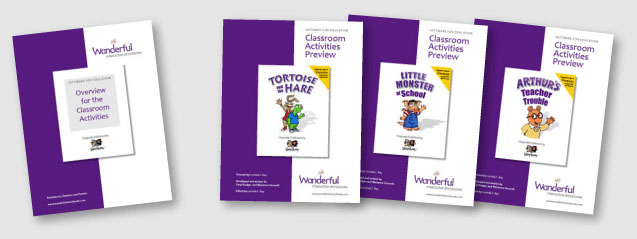

Classroom Activity guides are available as an in-app purchase, click to download the free preview
Download
Applications that teach children about Language
The Wanderful Interactive storybooks are being released in new languages and language combinations. Language as a central part of what makes these apps special - including the ability to instantly switch between the languages in each app. They are now available in the following full language versions: UK English


Collect them all...


© 2025 Wanderful, LLC (DBA: Wanderful Edutainment and Wanderful Interactive Storybooks). A Jordan Freeman Group Company. Powered by ZOOM Platform. All Rights Reserved. Living Books is a registered trademark of Houghton Mifflin Harcourt, used with permission. Arthur, © Marc Brown Studios, All Rights Reserved. Little Critter, Little Monster, © Mercer Mayer, All Rights Reserved.


